
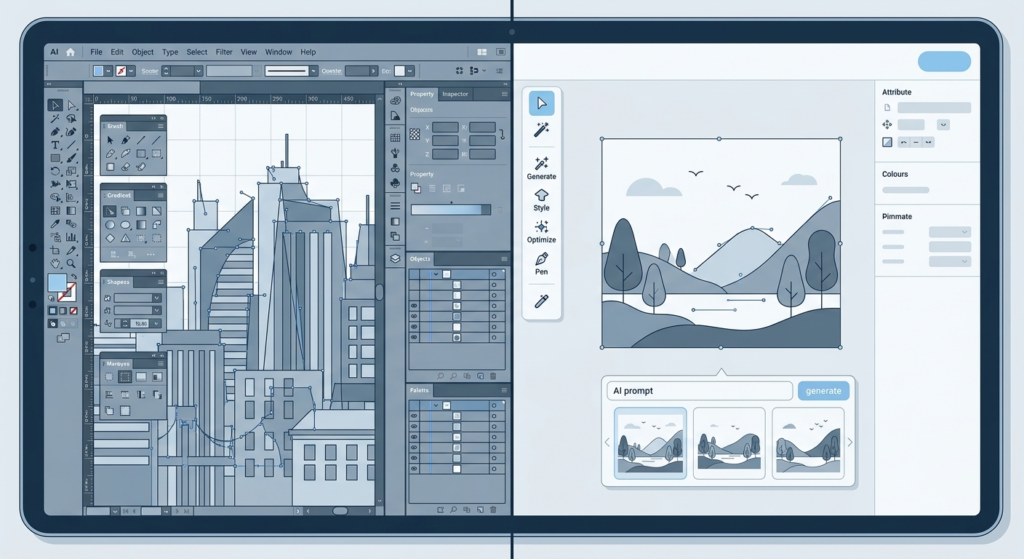

Adobe Illustrator has been the default tool for working with vector files for over three decades. For many designers and production teams, opening Illustrator to handle an SVG conversion is so automatic it barely registers as a decision. But automatic is not the same as optimal, and for teams doing high-volume SVG conversion work, the gap between what Illustrator offers and what a purpose-built SVG conversion tool offers has become significant.
This comparison focuses specifically on SVG conversion: taking files in one format and producing clean, production-ready SVG output. It is not a general design software comparison. If you are already using a dedicated SVG converter or considering one as an addition to your Illustrator workflow, this breakdown will help you understand exactly where each tool is faster, where quality differs, and what the cost implications are for production teams.
The comparison is structured around the questions production teams actually ask: How fast can I process a single file? Can I handle batches? How clean is the output? And what does the tool cost relative to the volume of work it handles?
The Core Difference: General Purpose vs Purpose-Built
Adobe Illustrator is a complete professional illustration environment. SVG conversion is one of dozens of capabilities it offers alongside a full typography engine, complex gradient and effects tools, print production features, pattern creation, and much more. That breadth is Illustrator’s strength for complex creative work and its weakness for high-volume conversion workflows.
SVGMaker is built specifically around SVG: generation, editing, conversion, validation, and optimisation. Every feature in the tool exists to make SVG files better. This focus means the conversion workflow has fewer steps, less configuration, and outputs that are clean for web and production use without post-processing.
Illustrator is a creative environment that converts SVG. SVGMaker is an SVG platform that does everything needed around that file format. The distinction matters when you are processing files at volume.
Single File Conversion: Step Count and Time
For a single PNG logo conversion to SVG, the Illustrator workflow typically looks like this: open Illustrator, create a new document at the right artboard size, place or open the PNG, use Image Trace to vectorise it, adjust the trace settings until the output looks correct, expand the trace, clean up the resulting paths manually, remove the raster image from the file, export as SVG, and choose from several export options dialogs before the file is written.
For an experienced Illustrator user, that process takes roughly five to ten minutes for a clean result. For someone less fluent with Image Trace settings, it can take significantly longer, particularly for complex images where the default trace settings produce poor results.
In SVGMaker, the same conversion: upload the PNG, the tool applies AI-assisted vectorisation, review the output, download the SVG. For most files this is under 60 seconds. The SVGMaker output also passes through automatic validation and optimisation, so what you download is already clean and web-ready.
Batch Conversion: Where the Gap Becomes Critical
Single-file conversion speed matters for occasional work. Batch conversion speed defines whether a tool is viable for production. And this is where the comparison between Illustrator and SVGMaker becomes unambiguous.
Illustrator does not have native batch SVG conversion. To process 50 PNG files into SVGs using Illustrator, you are either opening and processing each file manually one by one, or you are writing a custom Action and running it as a batch script, which requires scripting knowledge and significant setup time for each unique conversion scenario.
SVGMaker handles batch conversion natively. Upload multiple files and receive multiple converted SVGs. For teams with API access, the batch processing capability allows SVG conversion to be integrated directly into an existing production pipeline, with files processed asynchronously at scale. For a print shop receiving client artwork in various formats, or a design agency standardising a large asset library, this is a fundamentally different capability, not just a speed difference.
A team that processes 200 file conversions per month saves roughly 15 to 20 hours of manual Illustrator work by switching to batch SVG conversion. At production rates, that is a meaningful operating cost difference.
Output Quality: What Does Clean SVG Mean?
Both tools produce SVG files. The quality difference is in what those SVG files contain.
Illustrator SVG exports are known in the development community for carrying significant legacy overhead. A simple icon exported from Illustrator often contains Adobe-specific XML namespaces, editor metadata, empty group elements, explicit default attribute values, and sometimes inline style declarations that inflate file size without changing the visual output. A well-known rule of thumb in front-end development is that Illustrator SVG exports need to be run through an SVG optimiser before use in production.
SVGMaker’s conversion output is designed for production use from the start. The tool applies SVGO-equivalent optimisation as part of the conversion pass. Files are clean, compact, and do not carry design software metadata. For web use specifically, this matters: a 12KB Illustrator SVG export might become a 1.8KB SVGMaker output of the same visual asset.
For cutting machine use (Cricut, Silhouette, laser cutters), the SVGMaker output also passes through format normalisation, ensuring strokes are converted to paths and layer structures are properly separated. Illustrator can produce these results, but they require manual configuration of export settings that are not obvious to non-specialist users.
Format Support: What Can Each Tool Convert?
Illustrator handles: AI, EPS, PDF, SVG, DXF, and raster imports (PNG, JPEG, TIFF) via Image Trace. It exports to the same vector formats plus raster via export options. Its coverage is broad but each format requires manual configuration.
SVGMaker converts between SVG, PNG, JPG, WebP, TIFF, EPS, AI, PDF, DXF, and JSX. The conversion paths are purpose-built for common production scenarios: PNG to SVG, SVG to PNG, SVG to PDF, JPG to SVG, and the reverse directions. For web and print-production teams, the most common conversion paths are all covered with clean, standardised output.
Pricing: What Are You Actually Paying For?
Adobe Illustrator as a standalone subscription costs significantly more per month than SVGMaker. As part of Creative Cloud (which most professional users subscribe to for the full suite), the incremental cost of Illustrator specifically is harder to isolate. But for a team whose primary use of Illustrator is SVG conversion, that subscription cost is difficult to justify relative to a purpose-built tool.
SVGMaker’s pricing is structured around usage and conversion volume, making it cost-effective for teams whose work is specifically SVG-focused. For developers and production teams who need API access for batch processing, the API tier offers a cost-per-conversion model that scales more predictably than a flat creative suite subscription.
Who Should Still Use Illustrator for SVG Work?
Illustrator remains the right choice in specific scenarios:
- When SVG conversion is incidental to a broader creative workflow that also involves complex illustration, print production, or typographic work that requires Illustrator’s full feature set
- When the project requires precise manual path editing at a level of detail that a visual editor cannot match
- When working with legacy .AI files where Illustrator’s native format compatibility is essential
- When the design team is already highly fluent in Illustrator and the conversion volume is low enough that speed is not a priority
For teams whose primary need is clean SVG output at speed and volume, adding SVGMaker alongside Illustrator, rather than instead of it, is often the most practical approach. Illustrator handles the creative work; SVGMaker handles the production conversion and batch processing.
The Verdict for Production Teams
For single-file conversion by an expert Illustrator user: the tools are comparable in output quality, with Illustrator requiring more manual steps. For batch conversion, API integration, web-ready output quality, and cost efficiency at production volume: SVGMaker is faster, cleaner, and more cost-effective in every measurable way.The most effective production workflows use both tools for what each does best. Creative assets are designed in Illustrator; production conversion, validation, and batch processing are handled by SVGMaker. If your team currently relies entirely on Illustrator for SVG conversion and is spending significant time on that task, the SVGMaker converter is the fastest way to recover that time.
Read More Blogs