

Technology readiness is no longer just an IT concern. It affects customer service, billing, collaboration, security, and a company’s ability to grow without constant disruption. Businesses evaluating managed IT services Fresno or building an internal technology process can use this checklist to identify gaps and turn broad concerns into practical priorities.
IT readiness does not mean buying every new platform or replacing systems that still work. It means understanding what the business depends on, reducing avoidable risk, preparing for interruptions, and assigning clear ownership for daily support and long-term decisions.
Why IT Readiness Matters in 2026
A small technology issue can become a business-wide problem when employees cannot access email, files, line-of-business software, phones, or customer records. Reactive support focuses on restoring service after something breaks. Proactive readiness focuses on preventing common failures, limiting their impact, and making recovery more predictable.
Strong readiness also makes change easier. Whether a business adds employees, opens another location, adopts a new application, or supports more remote work, documented systems and processes reduce confusion and unnecessary downtime.
Build a Complete IT Inventory
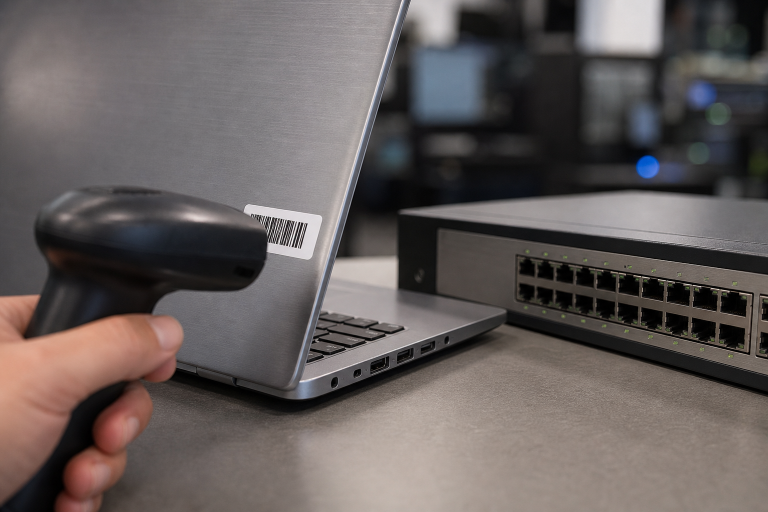
Create one reliable record of the technology environment. Include laptops, desktops, mobile devices, servers, printers, firewalls, switches, wireless access points, and other equipment. Record each device’s age, operating system, warranty status, assigned user, and expected replacement date.
The inventory should also cover software licenses, subscriptions, cloud platforms, renewal dates, internet providers, vendors, and administrative accounts. Identify who owns each system and who can make changes. This information supports budgeting, audits, incident response, new-hire setup, offboarding, and replacement planning.
Review Identity and Access Controls
Access should match a person’s role, not simply their seniority or length of employment. Remove inactive accounts promptly, avoid shared logins when possible, and use separate administrator accounts for sensitive work. Apply the least-privilege principle so users receive only the access they need.
Require multi-factor authentication for email, cloud applications, remote access, banking platforms, and administrator accounts. Review access at least quarterly and after role changes. The CISA small and medium-sized business resources offer useful guidance on multi-factor authentication, updates, backups, incident planning, and other core security practices.
Strengthen Endpoint and Network Security
Keep operating systems, browsers, business applications, routers, firewalls, and wireless equipment up to date. Use endpoint protection on company-managed devices, separate guest Wi-Fi from business systems, and remove remote access tools that are no longer necessary. Monitor unusual login attempts and unexpected device or network activity.
Fast internet does not automatically mean a reliable network. Poor wireless coverage, aging access points, crowded channels, or poorly placed equipment can slow work in offices, warehouses, and shared spaces. Review real-world coverage where employees actually work.
Test Backups and Recovery Plans
A backup is useful only if the business can restore the right information within an acceptable timeframe. Identify the systems and data that must be restored first, then set recovery time and recovery point objectives. Keep at least one protected backup copy separate from the primary environment, and restrict access to backup administration tools.
Test both individual file restores and larger system recovery on a schedule. Record what worked, what failed, and how long recovery took. Include emergency contacts, vendor details, communication steps, alternate work arrangements, and approval authority in the recovery plan.
Make Deliberate Cloud Decisions
Cloud adoption should be a business decision, not a trend-driven migration. Review which applications improve collaboration or remote access, then consider latency, large-file performance, integrations, data retention, privacy requirements, and local equipment needs. Compare subscription pricing with migration, support, administration, storage, and training costs.
Confirm how each provider handles outages, account recovery, data export, and backups. Moving a workload to the cloud does not remove responsibility for access controls, configuration, or recovery planning.
Prepare for Employee Changes
Use repeatable onboarding and offboarding checklists. For each role, define the standard devices, applications, permissions, and training required. When employees leave or change positions, remove their access quickly, recover company equipment and security tokens, and document the actions taken. This process becomes especially important with contractors, seasonal staff, remote employees, and multiple locations.
Define Support, Incident, and Vendor Roles
Employees should know exactly where to report routine technical issues, urgent outages, and suspected security incidents. Establish a primary support channel, response targets based on business impact, emergency approval authority, and escalation contacts. Assign responsibilities across technology, leadership, communications, legal needs, and continuity planning.
Review vendors that store, process, or access company information. Track contract terms, renewal dates, support hours, service commitments, and procedures for retrieving data if a relationship ends. Keep key vendor contacts outside systems that may be unavailable during an outage.
Create a 30-60-90 Day Action Plan
First 30 Days
- Complete the hardware, software, account, and vendor inventory.
- Enable multi-factor authentication for high-risk accounts.
- Remove inactive accounts and test a basic backup restore.
Days 31-60
- Review wireless coverage, network performance, and remote access.
- Update onboarding, offboarding, and incident-response checklists.
- Provide security awareness training to employees.
Days 61-90
- Plan replacement for aging equipment and unsupported software.
- Review cloud costs, licenses, and unused services.
- Test a broader recovery scenario and schedule quarterly reviews.
Common Mistakes and Questions to Ask
Avoid waiting for equipment to fail before planning replacement, assuming backup alerts guarantee recoverability, granting broad permissions for convenience, or leaving key processes in one person’s memory. Measure readiness through update compliance, MFA coverage, restore-test results, response times, unsupported systems, training completion, and progress against planned priorities.
Most businesses benefit from a full annual assessment plus quarterly checks for access, backups, device health, and major changes. First, fix issues that could stop operations, expose sensitive information, or prevent recovery. For broader continuity planning, the SBA emergency preparedness guidance can help businesses assess risks, create response plans, and practice them with staff.
Conclusion
IT readiness is an ongoing business habit, not a one-time project. A clear inventory, stronger account controls, tested backups, practical cloud planning, and defined support roles help growing businesses reduce interruptions and make better technology decisions throughout 2026.